Tuesday, July 15, 2008

Is That Megabytes or Megabits per Second?

I'm very conscious of the use of notation conventions when expressing data rates. For whatever reasons, I've settled on using "Mbps" for "megabits per second" and "MB/s" to indicate "megabytes per second." This works fine for my own purposes, but the many conventions can lead to disastrous misunderstandings. Just this week, I ran processes (encoding h.264 video) that took two days on three computers. If I'd mistaken someone's "MPBS" notation as "megabytes per second" when they really meant "megabits per second" when estimating the time for the jobs to complete, I'd have been waiting an extra two weeks for the three computers.

Engineer Lee Goldberg has written a nice treatise on the state of data rate notation.

For my part, I'll try to start using Goldberg's "old-school" electrical-engineering conventions, which are invulnerable to mis-interpretation:
  • xbits/s (with x = k, M or G as kilo-, Mega- and Giga-)
  • xbytes/s

Monday, June 30, 2008

Convert Microsoft Office 2008 for Mac and 2007 Microsoft Office Files with Older Office for Mac Versions

Apple's website began hosting a download page for the Microsoft Office Open XML File Format Converter 1.0 on June 25, 2008. The converter actually downloads directly from Microsoft servers. A couple of months ago, links to a similarly described converter download at Microsoft were dead from several days, if not longer.

According to this Apple Downloads page, this converter promises to convert "files that were created in Office 2008 for Mac or 2007 Microsoft Office system so that you can open and edit the files in Office 2004 version 11.4 or later and Office v. X version 10.1.9 or later. Word documents, Excel workbooks, and PowerPoint presentations that are created in Office 2008 for Mac or 2007 Microsoft Office system are saved in the Open XML Format."

Friday, June 06, 2008

Jumpcut, a Great Clipboard Manager for Mac - and It's Free!

I previously sang the praises of Jumpcut here at Useful Bulk, but today when discussing utility software with my wife, she said, "You know what piece of software I use every day? And I know you do too, because I've seen you using it." It took me a couple of guesses, because we use a lot of software, but also because Jumpcut is so transparent to me in its use. Jumpcut is now as natural for me to invoke as the Undo, Cut, Copy and Paste commands I've been typing for 20 years (Command-Z, X, C and V).

What is the Clipboard?
Modern operating systems provide cut & paste and copy & paste functionality to users. When the user selects material for the copy or cut operation, that content (which can be text, images, sound, video, or even 3D objects, depending upon the operating system and the current application) is placed into a temporary repository known as the clipboard. The clipboard's contents can then be pasted into any compatible document, even in a different application. Further, the clipboard retains the last copied contents even after a paste operation, so the same contents can be pasted multiple times. When the user next invokes a copy or cut command (copy leaves the selected material in place, cut removes it from the current document), the contents of the clipboard are replaced.

So conventional clipboards can hold the contents of a single copy operation. Jumpcut allows the user to "buffer" many clippings (by default, it's configured to save the last 40).

Using Jumpcut
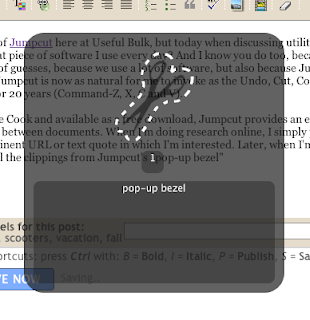
Written by programmer Steve Cook and available as a free and open-source download, Jumpcut provides an elegant solution for moving many text "clippings" between documents. When I'm doing research online or quoting another document, I perform typical "Copy" operations on any pertinent URLs or text quotes in which I'm interested. Later, when I'm editing a document for publication, I simply recall the clippings from Jumpcut's "pop-up bezel" (invoked with a keystroke combination - the default is "option-command-V") or from Jumpcut's menulet in the Menu Bar, and the selected clipping is pasted into my document.
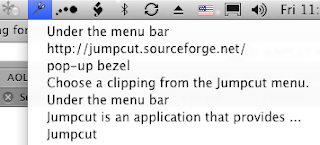


Jumpcut's current version as listed on its Sourceforge page as v0.61, but v0.62 is available for download at MacUpdate. Don't be scared off by the low version number - during several years of daily use, Jumpcut has been very stable.

We've found Jumpcut an absolutely invaluable tool, and a perfect extension to the Mac OS (this should just be part of the Mac OS). No one should be without it.

Sunday, June 01, 2008

Geotag Your Photos Without a Computer

The ATP Photo Finder is a GPS logger with a built-in SD/Memory Stick/MMC reader. After taking photos with your digital camera, users insert the camera's memory card into the Photo Finder, which adds the GPS data to the existing image files.

This makes this product quite a bit easier to use than previous methods, as in my previous article about geotagging on a Mac.

The ATP Photo Finder retails for $100, but at the time of this writing (June 2008), is available at Costco (membership required) for $80.

Friday, May 30, 2008

Logitech G25 Racing Wheel Long-term Review

Is the Logitech G25 Racing Wheel worth $300?

If you're a serious sim-racing enthusiast, the answer is yes.

 Read my long-term review.

Monday, May 26, 2008

Follow the Phoenix Mars Lander Mission

I just watched the thrilling live coverage of the Phoenix Lander's successful touchdown on Mars (delayed 15 minutes by the signal traveling from Mars to Earth and by the 9 hours it took me to have time to watch the Science Channel HD live coverage on our DVR - but it was still exciting).

The Phoenix has deployed its solar panels, stereoscopic camera and some of its instrument packages. Now those teams of scientists who have been planning the mission for nearly a decade will attempt to make the most of the next 90 days to analyze the contents of the ice under the surface of the soil in the polar region which Phoenix now calls home. Phoenix will attempt to look for signs of organic life and analyze atmospheric properties. After about three months, the Phoenix mission will end as the lander is encased in one meter of frozen carbon dioxide during the Martian winter.

Follow Phoenix' progress on NASA Jet Propulsion Lab's Phoenix site and the University of Arizona's Phoenix site (the U of A is the first public university to lead a Mars mission).

Saturday, May 10, 2008

Geotagging Photo with GPS Location Information on a Macintosh

I've written and article of my experience with geotagging digital photos using a tiny and relatively inexpensive GPS logging device, any digital camera and a Macintosh. With these components, the location of each photograph can be embedded into the image file. A cool application: images can be displayed on maps in their relative locations.